
Introducing PremaTax Accruals.

Premium tax accruals, powered by the same engine that calculates the tax returns.
Turn monthly premium data into a defensible premium tax accrual, without maintaining a separate tax model in Excel.
PremaTax Accruals combines actual year-to-date premium, your forecast for the remainder of the year, and PremaTax’s production tax calculation engine to determine required premium tax expense by jurisdiction.
Review the results. Understand what changed. Reconcile what Accounting has already posted. Then export the workpaper and journal entry needed to close the period.
Upload premiums by state page line of business using an Excel format. Determine how the remainder of the year should be projected.
Straight-Line Projection
Project the remainder of the year assuming the remaining months will write, on average, the same number of premiums.
Uneven Distribution
Enter the percentage of annual premiums you want to assume will be written in each month. The user will be informed if the percentages entered do not add up to 100%.
Uploaded Forecast
Import remaining-year premium from an actuarial, FP&A, or planning model.
Actual YTD premium plus remaining-year premium forecast becomes the projected annual premium that PremaTax uses for the tax calculation.
As new premium arrives each month, the remaining-year premium forecast are recalculated according to the new information.
Upload monthly premiums.


Review effective tax rates by line of business by state.
PremaTax calculates the accrual at the jurisdiction and line-of-business level.
For each line of business, the system considers projected full-year tax and projected full-year premium to derive the effective rate applicable to that line of business. That rate is then applied to the line of business’s actual year-to-date premium to determine required YTD expense.
This preserves differences in:
-
Premium mix
-
Retaliatory positions
-
Fees and certain assessments
-
State-specific tax components

Calculate projected taxes and fees.
Calculate the accrual using PremaTax’s tax engine.
Default assumptions are made which can be adjusted as desired. For example, users can override tax rates to apply to accruals if a tax rate will be changed for the upcoming tax season.
The calculation runs on an isolated copy of the tax year, so your accrual analysis doesn’t affect your live compliance data.
The result is a full-year projection of applicable premium tax components, including premium tax and retaliatory tax, which PremaTax then uses to determine the amount of expense that should be recognized through the current close period.
Your filings stay untouched. Your accrual stays connected to the tax calculation.

Configure your IPT accrual projections.
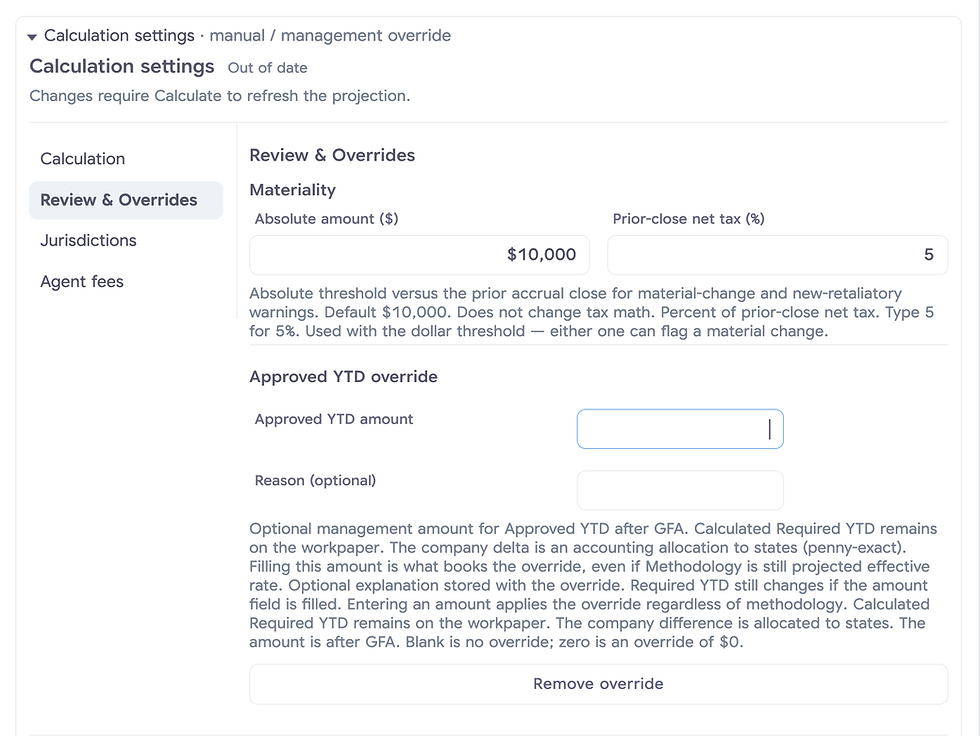
Choose your calculation methodology and tailor state-specific tax assumptions, municipal fees, and agent counts. Set materiality thresholds to flag significant changes, and apply an approved YTD override when a management adjustment is needed.



Get accurate tax burden estimates by line of business.
Using this granular data, you can give your company’s actuaries and product underwriters the premium-tax rate by line of business and state. Premium taxes (and retaliatory and other related taxes) follow the premium, the line of business, and the state. It belongs in the expense load used to calculate the rate.
-
The Problem: If your actuaries simply look at a state’s standard premium tax rate(s), they are pricing your products blindly. For example, in a state like New York, a Commercial Multi-Peril policy might trigger a local Fire Marshal and/or MTA tax surcharge, whereas a Workers’ Compensation policy is legally exempt from those specific surcharges.
-
The Solution: Because PremaTax Accruals runs sandbox statutory returns against your rolling premium data, it isolates the exact, granular Effective Tax Rate (ETR) for each NAIC Line of Business individually. Your actuarial team can pull these exact ETR percentages to build precise expense loads directly into your rate-filing models.
Underwriting and Investment Exhibit - Part 3
The Underwriting and Investment Exhibit is due to the NAIC each year by March 1. Part 3, Line 20 of this exhibit is for “Taxes, licenses and fees” (2026 version). It requires the following amounts (among other items):
-
Premium Tax
-
Municipal Tax
-
Municipal License Fees
-
Fees based upon premiums
-
Certain assessments
-
Agent Fees
-
Fees for certificates of authority, compliance, deposit, etc.
-
Filing Fees
-
Marine profits taxes
-
Gross guaranty association assessments
-
GFA Credits
Before March 1 of each year, only some of this information may be known. What about the returns that haven’t been filed? Many insurance premium tax annual returns are also due on March 1, and some later. PremaTax Accruals can calculate this within minutes, providing an easy to use UIE3 Export that provides all of this data to the person or team that prepares your Annual Statement.
Current-year guaranty fund assessments come from the GFA Assessment Schedule already in PremaTax. That amortization schedule lists the credits that can be taken this year. Those amounts will be included in the UIE3 Export.

Premium tax accruals belong in your premium tax system.
The premium tax forms, schedules, credits, and retaliatory tax logic are already there.
Your accrual process should be able to use them.
See how PremaTax Accruals turns monthly premium data into a reviewable, accounting-ready premium tax close.